
Local AI: What it is, why it's trending, and how to install it yourself
Why a growing number of professionals are running models on their own laptops and how to try it in 10 minutes.

TL;DR: A growing number of people are running AI models on their own computers instead of in the cloud. Here’s why, and how to try it yourself.
Before I open an AI tool, I ask myself: Would I paste this into a stranger’s inbox?
If the answer is yes, a cloud AI tool is fine. I use whatever’s fastest. If not, that’s local AI’s job.
You might not know this, but you have a real choice about where your prompts and thinking happen. Your conversations with AI don’t have to be available to someone else. And, instead of paying a $20-$30 subscription, you could run AI on your own device for the cost of electricity.
What is local AI?
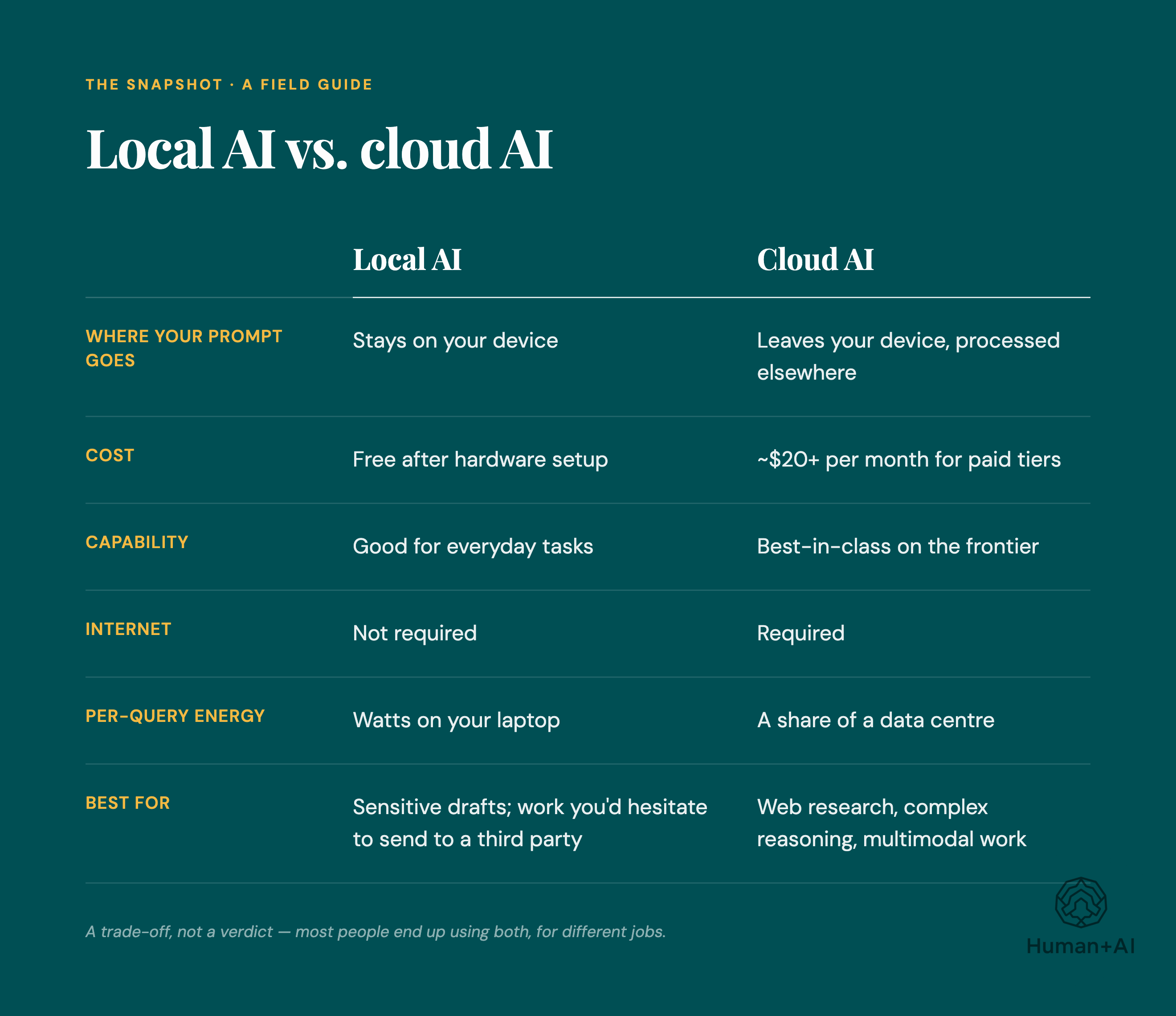
When you use ChatGPT or Claude, your prompts travel over the internet to a data centre, where an LLM processes them and sends a response. You're renting access to someone else's model, and the company running it can typically see what you send, depending on its settings and policies.
Local AI flips that: you download an LLM, or “open weights model,” and run the trained model parameters, or weights, on your own hardware. By default, everything stays on your machine. No company sees your prompts unless your setup sends data elsewhere.
The models come from Meta (Llama), Google (Gemma), Alibaba (Qwen), and DeepSeek, among others — all open-weights, meaning you download and run them without paying per token.
Two of the most common tools to get these models are Ollama (free, open-source, command-line first, works on Mac/Windows/Linux) and LM Studio (free, visual interface, easier if you’d rather not touch a terminal).
Why is local AI trending now?
Local AI has been a niche interest for developers and privacy advocates for years. Three things have changed.
Open-source models got good fast. Two years ago they trailed commercial models on most tasks. Today, many hold their own against commercial offerings on writing, summarization, analysis, and structured reasoning. They still lag on the hardest reasoning benchmarks, but that gap doesn’t drive most day-to-day decisions anymore.
The privacy stakes got real. One example: on March 20, 2023, a bug in ChatGPT exposed some users’ chat titles and, for about 1.2% of ChatGPT Plus subscribers, billing information (names, addresses, expiration dates, and the last four digits of credit cards) during a nine-hour window.
The energy footprint got harder to ignore. The IEA estimates data centres consumed around 1-1.3% of global electricity in 2022, and projects data centre electricity consumption will roughly double by 2030 — about 3% of global demand, with AI as a major driver.
You have a real choice about where your prompts and thinking happen.
The core benefits: Privacy, control, and cost
Privacy. If you’re a therapist drafting session notes, a lawyer working on strategy memos, or a journalist protecting a source, sending material to a cloud AI creates risk. Local models keep your prompts on your device by default. For professionals bound by confidentiality obligations, that can be the difference between using AI at all and avoiding it entirely.
Control. Cloud models can change without much warning. A prompt that worked last month might produce a different result today because the provider updated the model or the system around it. This is known as “prompt drift.”
With a local model, you pick the version and it stays the same until you decide to change it. You can also run models without the content filters cloud providers apply — useful for security researchers analyzing malware or novelists working with difficult material.
Cost. Cloud AI charges per token. A local model has no per-token fee once you own the hardware. For heavy users, especially small teams running AI-assisted workflows all day, the economics can move toward owning the machine after a few months.
From personal privacy to national security: The rise of sovereign AI
The same dynamic is playing out at the nation-state level.
Last month, the UK launched its Sovereign AI Unit, a £500 million venture fund designed to back British AI startups and reduce reliance on foreign AI infrastructure. India’s IndiaAI Mission has committed $1.24 billion (₹10,300 crore) to building domestic compute and deploying over 10,000 GPUs. The EU, Japan, and Saudi Arabia are making similar moves.
Last month, the Canadian government opened applications for its $2-billion Sovereign AI Compute Strategy, first announced in Budget 2024, “ensuring Canada maintains control over its AI technology, talent, and data.”
The underlying logic: depending entirely on another country’s or company’s AI for critical functions creates strategic vulnerability. Renting intelligence from a single provider means accepting that provider’s terms, timelines, and priorities.
Hardware guide: What you need to run local AI
Entry-level: Running AI on Mac M-Series
For basic tasks like summarizing documents, drafting emails, and chatting with smaller models, a newish laptop with 16GB of RAM is enough. Apple’s M-series MacBooks are popular because their unified memory architecture lets the model share the same RAM as everything else.
High-performance: The cost of a desktop GPU setup
For larger models that can handle more complex reasoning, you want a desktop with a high-end NVIDIA GPU (an RTX 4090, or a used enterprise card like an A6000) with 24-48GB of dedicated video memory. These setups use more power, generate heat, and can be noisy.
Depending on your usage and local rates, running one continuously can add $80-$120 a month to your electricity bill. This isn’t sleek and invisible, it’s a physical commitment.
Local vs. cloud: What you give up going local
With Ollama or LM Studio, you’ll choose your own models, manage your own updates, and troubleshoot. There’s no IT help desk. There are materials online that can help, though. I wrote a guide and there are others out there you can use, too.
You’ll also lose some of the safety net that cloud providers provide. These providers apply content filters, which can be imperfect and sometimes frustrating, but they can also be helpful. When you run an unfiltered local model, you’re responsible for how it’s used (this is more important if you’re a small business using local AI and providing it to employees, for instance).
The frontier still lives in the cloud. If you need the absolute best reasoning, local hardware can’t match it yet.
And hardware depreciates. The GPU you buy this year will likely be outpaced next year.
Who local AI is for
For you if: You work with sensitive material, you want stable and consistent AI workflows, you’re curious about the inner workings of the technology, or you’d rather not hand your thinking to a third party. Also useful if you don’t want to pay for a monthly subscription.
Not for you if: You need frontier-level reasoning, you depend on live web data, or you expect cloud-tier performance on a five-year-old laptop.
So, why should you care?
The mere existence of local AI puts pressure on cloud providers to offer better privacy protections, clearer data handling, and more stable models. The option to leave keeps incumbents honest.
Get the Beginner’s Guide to Local AI
A recent MacBook, a free download of LM Studio, and about ten minutes of setup gets you a working local AI. If those ten minutes of setup are the only thing standing between you and trying this, I wrote a guide to help you set up your local AI.
A Beginner’s Guide to Local AI contains six plain language modules in the order you need them: why it matters, how it works, whether your device can run it, step-by-step setup with screenshots, how to choose a model, and six real workflows you can use right away.
Why local AI matters. The privacy and sustainability story without the doom.
How local AI works. A clear mental model, no computer science background required.
Can your device run it? A 30-second check. (Most can.)
Step-by-step setup. Real screenshots. One free tool (LM Studio). About 10 minutes from zero to your first local prompt.
How to choose a model. A simple decision framework with a one-page model picker.
Six real workflows. Email rewriting. Summarizing. Structuring. Reviewing. Research. First drafts. Things you’ll actually use.
Plus, a copy-paste prompt library and a quick reference card. It’s a 39-page PDF for Mac and Windows users.
It’s CAD$27, but for Human+AI readers, I’m offering it for less.
By the end, you’ll have a private AI running on your laptop, workflows you’ll actually use, and a copy-paste prompt library to start tonight.
CAD$27. Human+AI readers get $10 off with code HUMANAI10 → $17.
You have a choice about where your thinking happens. The AI you use doesn’t have to belong to someone else.
Not for you if: you’re a developer chasing model optimization, or you need real-time web data. I’d rather lose the sale than waste your money.
AI in the news
Google disrupts effort by criminal hackers to exploit vulnerability using AI (Globe and Mail) Google says it stopped a criminal hacking group from using AI to exploit a previously unknown software flaw, marking what cybersecurity experts describe as the arrival of “AI-driven” cyberattacks. The incident comes amid growing concern over advanced AI models like Anthropic’s Mythos, which have intensified debates in Washington and the tech industry over whether stronger AI regulation is now necessary.
UK schools should remove pupils’ online photos as AI blackmail threat grows, say experts (Guardian) Child safety experts and the UK’s National Crime Agency are urging schools to remove identifiable photos of students from websites and social media after criminals used AI tools to turn children’s images into fake sexually explicit content for blackmail schemes. The warning follows multiple sextortion incidents, including one involving a UK secondary school, highlighting how generative AI is rapidly expanding the scale and sophistication of online child exploitation threats.
Meta’s embrace of A.I. is making its employees miserable (NYT) Meta is facing internal backlash after telling employees it will track how they use their computers — including mouse movements, clicks and screen activity — to train its AI systems, with workers calling the move invasive and demoralizing. The controversy comes as CEO Mark Zuckerberg accelerates Meta’s AI transformation through layoffs, mandatory AI adoption and massive investment in “superintelligence,” fueling fears among employees that they may be training the systems that could eventually replace them.
Congrats on publishing an eBook!!!!
Congratulations on publishing an eBook, Nicolle! I am constantly impressed by how fast you move to test the new technologies then write up guides for how to use them! Local AI has been on my mind, but not something I've been able to move on yet. But someday!